

DocsWorking with visitors
Find and work through chats
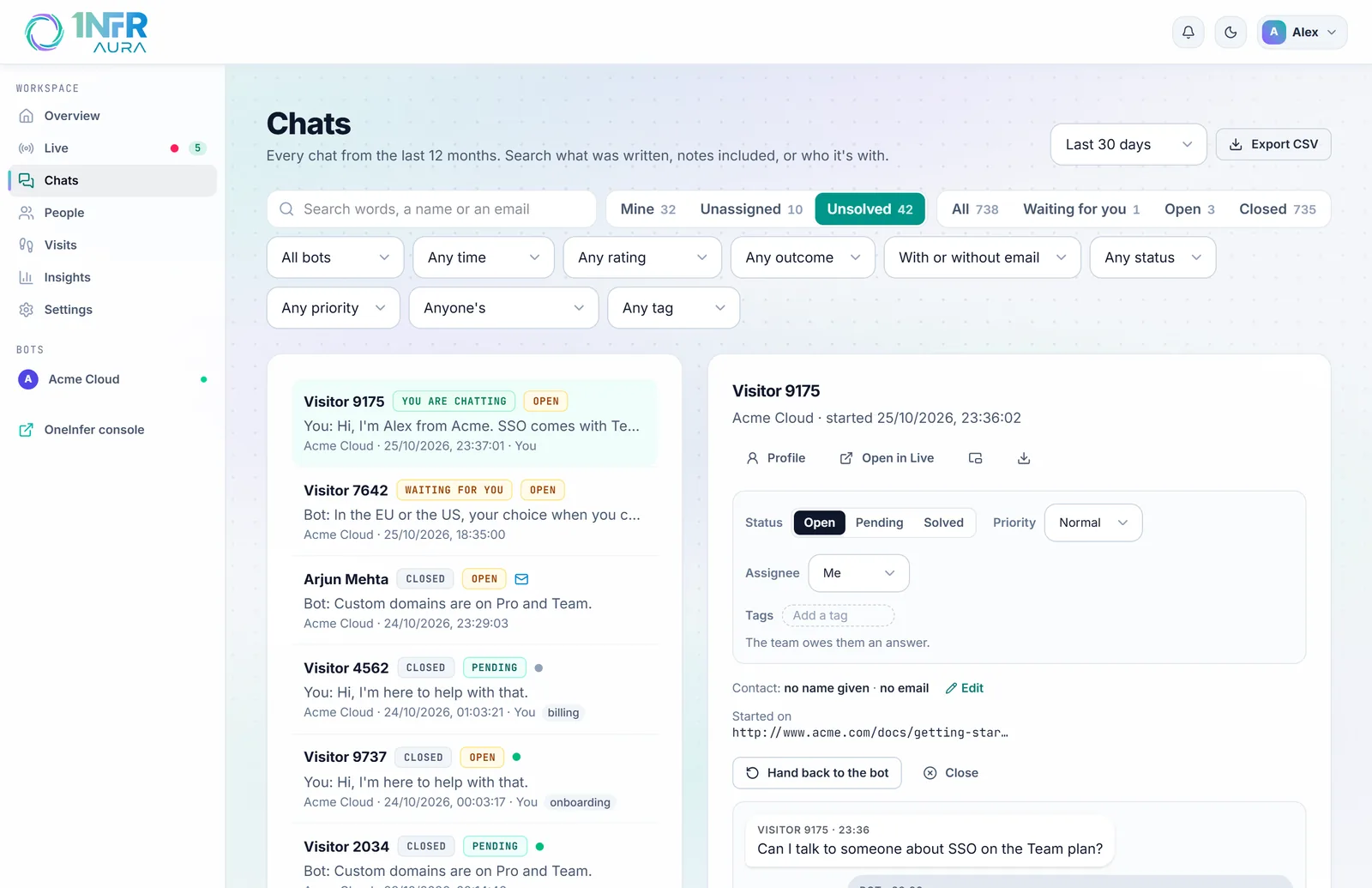
Chats keeps every conversation from the last 12 months. Search what was written, notes included, or who it's with, then read, reply or add a note.
Search
Type in Search words, a name or an email. Every word must match, ignoring case:
- Words match whole words in messages and notes, so "invoice" finds "Invoice #1042", but "invo" doesn't.
- Names, emails, your site's id for someone and labels like "Visitor 4821" match as you type, from the first two letters.
Views
The views across the top each show how many chats they hold:
| View | What's in it |
|---|---|
| Mine | Unsolved tickets assigned to you. |
| Unassigned | Unsolved tickets nobody is assigned. |
| Unsolved | Every open or pending ticket. |
| All | Every chat. |
| Waiting for you | Visitors waiting for a person now. |
| Open | Chats still going, with the bot or your team. |
| Closed | Chats that ended. |
Counts stop at 1,000 and show as "1,000+".
Filters

Combine any of these with a view and a search:
- Bot, and Last active: today, or the last 7, 30 or 90 days.
- Rating: rated good, rated not good, or not rated.
- How it went: went well, neutral or went badly (when the bot reads finished chats; see Answers).
- Email: left an email, or no email.
- Status, Priority, Assignee and Tag, for tickets.
Clear filters resets them all.
Read and reply
Choose a chat to open it beside the list. You'll see:
- its ticket panel: status, priority, assignee and tags;
- who it's with, which you can correct with Edit. The name and email you set are kept for their later chats, and replies are emailed to that address;
- the bot's one-line summary, when it reads finished chats;
- the whole conversation, notes included, with the reply box if the chat is still open.
Profile opens the person's page, Open in Live opens a chat that's still going on Live, and the icons open it in a window or download the transcript.
Pages of chats
Chats come 25 at a time. Change Rows to 50 or 100 (your choice is remembered), and move with the arrows: "26–50 of 312 chats · Page 2 of 13".
Export to CSV
Export CSV at the top downloads the chats started in the last 7, 30 or 90 days, the last 12 months, or between two dates you choose. There's no limit on how many.
Each row is one chat: its id and times, bot, visitor and email, state, who answered, when they asked for a person and when the team first replied, rating and comment, how it went and its summary, the page it started on, and the ticket's status, priority, assignee, tags and when it was solved.
Exporting needs a role that can reply to visitors. See Team and roles.